














Die Wahl zwischen 12V und 24V TRIAC-Treiber 1 verwirrt viele Käufer. Ich sehe diese Frage wöchentlich in unserer Shenzhen-Fabrik, und eine falsche Wahl bedeutet Flackern, Spannungsabfall 2, und kostspielige Nacharbeit. So lösen wir das.
Wählen Sie einen 12V-TRIAC-Treiber für kurze, leistungsarme, stark segmentierte LED-Installationen, bei denen feine Schnittabstände wichtig sind. Wählen Sie einen 24V-TRIAC-Treiber für längere Strecken und höhere Wattzahl, da dieser den Strom halbiert, den Spannungsabfall reduziert und die Systemeffizienz verbessert. Passen Sie die Treiberspannung immer an Ihre LED-Last an.
Das ist die kurze Antwort. Das vollständige Bild umfasst Streckenlänge, Strom, Dimmer-Kompatibilität und Kosten. Lassen Sie mich Sie Schritt für Schritt durch jede Entscheidung führen.
Wie entscheide ich zwischen 12V- und 24V-TRIAC-Treibern für mein Projekt?
Ein Distributor in Singapur schickte mir einmal einen Grundriss, bevor er einen einzigen Treiber bestellte. Diese Gewohnheit rettete ihr Projekt. In unserer Fabrik beginnen wir immer mit dem Layout, nicht mit dem Treiber.
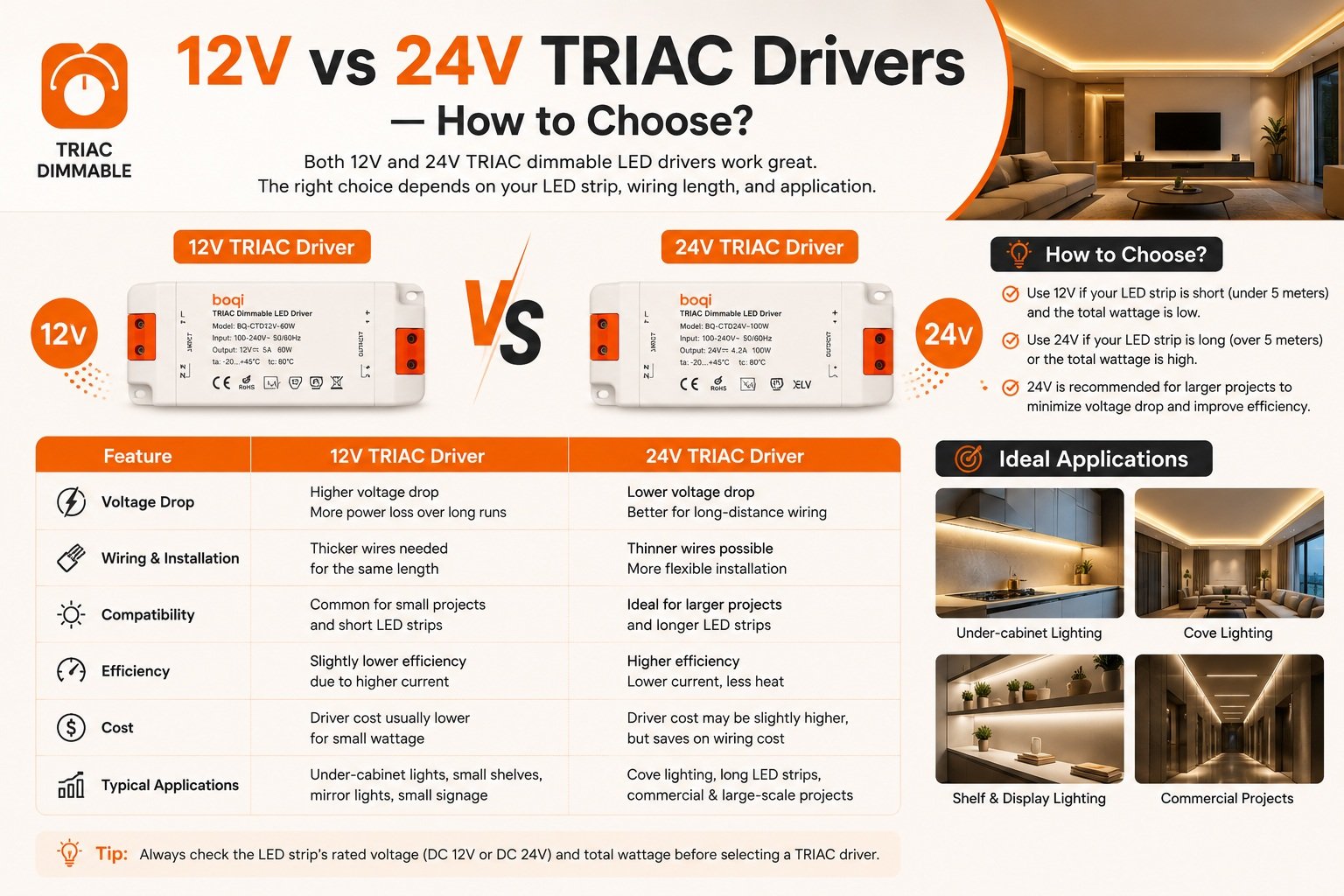
Entscheiden Sie zuerst nach Lastspannung, dann nach Streckenlänge und Leistung. Wählen Sie 12V für kompakte, leistungsarme Installationen unter etwa 5 Metern mit engen Schnittpunkten. Wählen Sie 24V für längere Strecken, höhere Wattzahl oder einseitig gespeiste Leitungen, da dies den halben Strom zieht und weniger Spannungsabfall erleidet.

Das erste, was ich Käufern sage, ist dies: Ein TRIAC-Treiber ist einfach eine netzkompatible, dimmbare Konstantspannungs-Stromversorgung. Die eigentliche Entscheidung ist also nicht “TRIAC vs. 12V/24V”. Es ist eine zweistufige Wahl. Erstens: Benötigt Ihr LED-Band 12V DC oder 24V DC? Zweitens: Ist der Treiber wirklich kompatibel mit Phasenabschnitt-Dimmung von Ihrem Wanddimmer?
Beginnen Sie mit einer einfachen Entscheidungsregel
Hier ist die Kurzreferenztabelle, die wir neuen Kunden teilen:
| Faktor | 12V wählen | 24V wählen |
|---|---|---|
| Streckenlänge | Unter ~5 Metern | Bis zu ~10 Meter pro Strecke |
| Schnittabstände | Feine Schnitte, oft alle 1 Zoll | Schnitte alle 2–4 Zoll |
| Leistungsniveau | Niedrigwatt-Akzentbeleuchtung | Höherwatt-Linearbeleuchtung |
| Stromaufnahme | Höher (doppelt bei gleicher Wattzahl) | Halber Strom bei gleicher Wattzahl |
| Typische Verwendung | Möbel, kleine Schränke, RV-ähnliche Setups | Küchen, Kleiderschränke, kommerzielle Linien |
Spannung entspricht nicht Helligkeit
Ein Missverständnis, das ich oft korrigiere: Spannung allein bestimmt nicht die Helligkeit. Helligkeit kommt von der Wattzahl des Bandes, der LED-Dichte und der gelieferten Leistung. Der praktische Unterschied zwischen 12V und 24V liegt in Strom, maximaler Streckenlänge, Schnittabstand und Steuerungskompatibilität. In der Praxis ist 24V meist die bessere Wahl für höherleistungsfähige Systeme oder längere Kabelstrecken, während 12V für kompakte, leistungsarme Anwendungen nützlich bleibt. Beide funktionieren mit einem TRIAC-Wanddimmer, aber nur wenn der Treiber spezifisch Phasenabschnitt-Eingang unterstützt.
Welche Faktoren sollte ich berücksichtigen, wenn ich die Treiberspannung an meine LED-Last anpasse?
Während eines kürzlichen OEM-Projekts für eine europäische Lichtmarke lehnten unsere Ingenieure ein Datenblatt ab, weil der 24V-Treiber mit gemischten 12V-Streifen gepaart war. Das frühzeitige Erkennen verhinderte eine Garantie-Katastrophe.
Passen Sie die Ausgangsspannung des Treibers exakt an Ihre LED-Last an – mischen Sie niemals 12V-Streifen mit 24V-Treibern. Überprüfen Sie dann die Gesamtwattzahl, halten Sie die Last bei oder unter 80% der Nennkapazität des Treibers und bestätigen Sie, dass die Streckenlänge innerhalb der Spannungsabfall-Grenzen für diese Spannung bleibt.

Die Spannungsanpassung ist nicht verhandelbar. Ein 24V-Treiber an einem 12V-Strip verbrennt die LEDs. Ein 12V-Treiber an einem 24V-Strip bringt kaum Licht. Aber Spannung ist nur die erste Prüfung. Watt-Reserve, Strom und Kabellänge sind genauso wichtig.
Die 80%-Headroom-Regel
Wir raten jedem Kunden, die gesamte LED-Last bei nicht mehr als 80% der maximalen Nennleistung des Treibers zu halten. Mit anderen Worten: Planen Sie mindestens 20% Reserve ein. Ein Treiber, der mit voller Last läuft, wird heiß, altert schneller und kann schlecht dimmen. Auf unserer Produktionslinie, thermische Belastung 3 ist der Hauptgrund für den Ausfall unterdimensionierter Treiber. Insbesondere interne Komponenten wie Schalt-MOSFETs und Kondensatoren in 24V-Treibern erfahren weniger thermische Belastung als jene in vergleichbaren 12V-Einheiten, was die Lebensdauer des Treibers oft verlängert.
Streckenlänge, Kabelquerschnitt und Spannungsabfall
Spannungsabfall ist das stille Problem. Eine 12V-Leitung bleibt typischerweise bis etwa 5 Meter sauber. Eine 24V-Leitung kann auf etwa 10 Meter gedehnt werden, bevor das entfernte Ende sichtbar dunkler wird. Da 24V den Strom halbiert, können Sie auch einen dünneren Drahtquerschnitt verwenden oder den Treiber weiter von der Last entfernt platzieren.
| Überlegung | 12V-System | 24V-System |
|---|---|---|
| Typische maximale Leitungslänge | ~5 m | ~10 m |
| Strom bei 60W Last | 5A | 2,5A |
| Benötigter Drahtquerschnitt | Dicker | Dünner akzeptabel |
| Wärme in Widerständen | Mehr Energie als Wärme verschwendet | Höhere Spannungsausnutzung, weniger Verlust |
| EMI auf DC-Leitungen | Höherer Strom, mehr EMI-Risiko | Niedrigerer Strom, weniger EMI |
Beachten Sie auch einen Trend, den wir in Exportaufträgen deutlich sehen: 24V wird zum Standard für hochdichte COB-Strips, da die 12V-Entsprechung zu viel Wärme auf der flexiblen Leiterplatte konzentriert.
Wie kann ich sicherstellen, dass meine TRIAC-Treiberwahl mit vorhandenen Dimmschaltern kompatibel ist?
Die schwierigsten Support-Tickets, die wir bearbeiten, betreffen nie den Treiber allein. Sie betreffen den Wanddimmer am anderen Ende. Deshalb pflegt unser Team eine getestete Dimmer-Kompatibilitätsliste für jede Treiberserie, die wir nach Europa und Australien liefern.
Bestätigen Sie drei Dinge: Der Treiber unterstützt explizit TRIAC-Phasenanschnitt-Eingang; der Dimmer-Typ – Leading Edge oder Trailing Edge – passt zur angegebenen Kompatibilität des Treibers; und die angeschlossene Last liegt innerhalb des Mindest- und Höchstbereichs des Dimmers. Testen Sie ein Gerät vor der vollständigen Einführung.

Hier ist die Falle: “Dimmbar” auf einem Datenblatt bedeutet nicht “mit Ihrem Dimmer kompatibel”.” TRIAC-Dimmung funktioniert, indem ein Teil der AC-Wellenform abgeschnitten wird. Es gibt zwei Varianten – Leading Edge vs. Trailing Edge. Leading-Edge-Dimmer (Phasenanschnitt) wurden für Glühlampen und magnetische Niedervolt-Transformatorlasten entwickelt. Trailing-Edge-Dimmer (Phasenabschnitt) passen besser zu elektronischen Treibern. Wenn Treiber und Dimmer nicht übereinstimmen, entstehen Brummen, Flackern oder tote Zonen am unteren Ende des Reglers.
Eine praktische Kompatibilitäts-Checkliste
- Prüfen Sie das Datenblatt des Treibers auf explizite TRIAC/Phasenanschnitt-Unterstützung, nicht nur auf das Wort “dimmbar”.”
- Identifizieren Sie Ihren Wanddimmer-Typ: Phasenanschnitt oder Phasenabschnitt.
- Verifizieren Sie die Mindestlast des Dimmers. Einige ältere TRIAC-Dimmer verhalten sich bei sehr kleinen LED-Lasten fehlerhaft.
- Testen Sie ein Treiber-Dimmer-Paar auf dem Prüfstand über den gesamten Dimmbereich, bevor Sie in großen Mengen bestellen.
- Achten Sie auf Flackern, Brummen, begrenzten Bereich oder Ausfall bei niedrigen Stufen – alles Anzeichen für eine Nichtübereinstimmung.
Warum TRIAC weiterhin wichtig ist
Einige Ingenieure argumentieren, dass TRIAC-Dimmen im Vergleich zu 0-10V, PWM oder digitalen Protokollen veraltet ist. Ich höre diesen Einwand auf Messen. Meine Antwort: Die Realität der Nachrüstung gewinnt. Millionen Haushalte haben bereits TRIAC-Wanddimmer, und Hausbesitzer möchten sie behalten. Genau deshalb bauen wir unsere dimmbare Treiberserie für flackerfreies Dimmen sowohl mit Leading-Edge- als auch mit Trailing-Edge-Eingängen. Ein weiterer Punkt, den es wert ist zu wissen: 24V-Treiber liefern oft eine bessere Dimmauflösung bei den niedrigsten 1–5%-Stufen, da der Spannungsüberschuss hilft, die LED-Durchlassspannung während kurzer PWM-Zyklen aufrechtzuerhalten.
Wird eine falsche Spannungswahl die Kosten, Effizienz oder Sicherheit meines Projekts beeinflussen?
Eine Einkaufsleiterin fragte mich einmal, warum ihr 12V-Unterbauprojekt doppelt so viele Netzteile benötigte wie das konkurrierende 24V-Angebot. Die Antwort veränderte die Spezifikation ihrer gesamten Produktlinie.
Ja. Die falsche Spannung erhöht die Gesamtkosten durch zusätzliche Treiber, dickere Verkabelung und Spannungsabfall-Korrekturen; sie verschwendet Energie als Wärme bei höherem Strom; und ein überlastetes oder nicht passendes System riskiert Überhitzung. Die richtige Spannung senkt die Lebenszykluskosten und verbessert Zuverlässigkeit und Sicherheit.
Lassen Sie mich die drei Bedenken trennen, da Käufer sie oft vermischen.
Kosten: Stückpreis vs. Systempreis
Ein 24V-Treiber kann in einigen Märkten pro Einheit etwas mehr kosten. Aber bei größeren Projekten spart er meist insgesamt Geld. Weniger Netzteile, dünneres Kabel und keine Spannungsabfall-Minderung summieren sich schnell. Für kleine Aufträge bleibt 12V günstiger und einfacher, da Komponenten überall verfügbar sind und die Leitungen kurz sind. Wenn wir OEM-Projekte kalkulieren, bepreisen wir immer das System, nicht die Box.
Effizienz: Treiber vs. System
Unterscheiden Sie Treibereffizienz von Systemeffizienz. Einige 24V-Treiber testen einige Prozentpunkte besser als vergleichbare 12V-Einheiten. Aber der größere Gewinn liegt in der Verkabelung: halber Strom bedeutet viel weniger Energieverlust im Kabel. Eine 24V-Architektur nutzt auch einen höheren Prozentsatz der Spannung in den LEDs selbst, sodass weniger Leistung als Wärme in Strombegrenzungswiderständen. verbrannt wird. Niedrigerer Strom reduziert sogar EMI entlang der DC-Leitungen – relevant für Haushalte mit drahtloser Automatisierung oder High-End-Audio.
Sicherheit und Zuverlässigkeit
Sowohl 12V als auch 24V liegen sicher innerhalb der SELV-Grenzen 4, und jeder Treiber, den wir exportieren, trägt die CE-Zertifizierung mit SELV-Isolation. Das eigentliche Sicherheitsrisiko ist thermisch: ein unterdimensionierter 12V-Treiber, der über 80% Last betrieben wird, oder dichte COB-Strips, die eine flexible Leiterplatte überhitzen.
| Auswirkungsbereich | Konsequenz bei falscher Wahl | Richtige Wahl – Vorteil |
|---|---|---|
| Kosten | Zusätzliche Treiber, schwerere Drahtstärke | Weniger Betriebsmittel, einfachere Verkabelung |
| Wirkungsgrad | Kabelverluste, Widerstandswärme | Geringere Stromaufnahme, kühlere Laufweise |
| Sicherheit | Überhitzte Treiber und Leiterplatten | SELV-zertifiziertes, thermisch stabiles System |
| Dimmen | Flackern, Ausfall, Brummen | Sanftes, flackerfreies Dimmen |
Schlussfolgerung
Falsche Spannung bedeutet Flackern, Abfall und verschwendetes Budget. Die Lösung ist einfach: 12V für Präzision und Kompaktheit, 24V für Effizienz und Skalierung – immer mit verifizierter TRIAC-Kompatibilität.
Fußnoten
Erklärt das grundlegende Halbleiterbauelement, das beim Phasenanschnitt-Dimmen für LED-Treiber verwendet wird. ↩︎
Technische Erklärung des elektrischen Widerstands und des Leistungsverlusts in Niederspannungs-Gleichstromkreisen. ↩︎
Erklärt die Auswirkungen von Wärme auf elektronische Komponenten und die Bedeutung des Wärmemanagements. ↩︎
Definiert Sicherheitsstandards für Niederspannungs-Elektrosysteme zur Verhinderung von Stromschlägen. ↩︎